Agentic coding platform · Desktop · Built on pi

Send in a team.
Not a prompt.

A full coding agent with a workspace around it: helpers in parallel, jobs that run for hours without you, and a design system it reads before it writes. Built on pi — your keys, any model, the meter in plain sight.

Open source, MIT · Any provider, your own key · Nothing leaves this computer

graphe
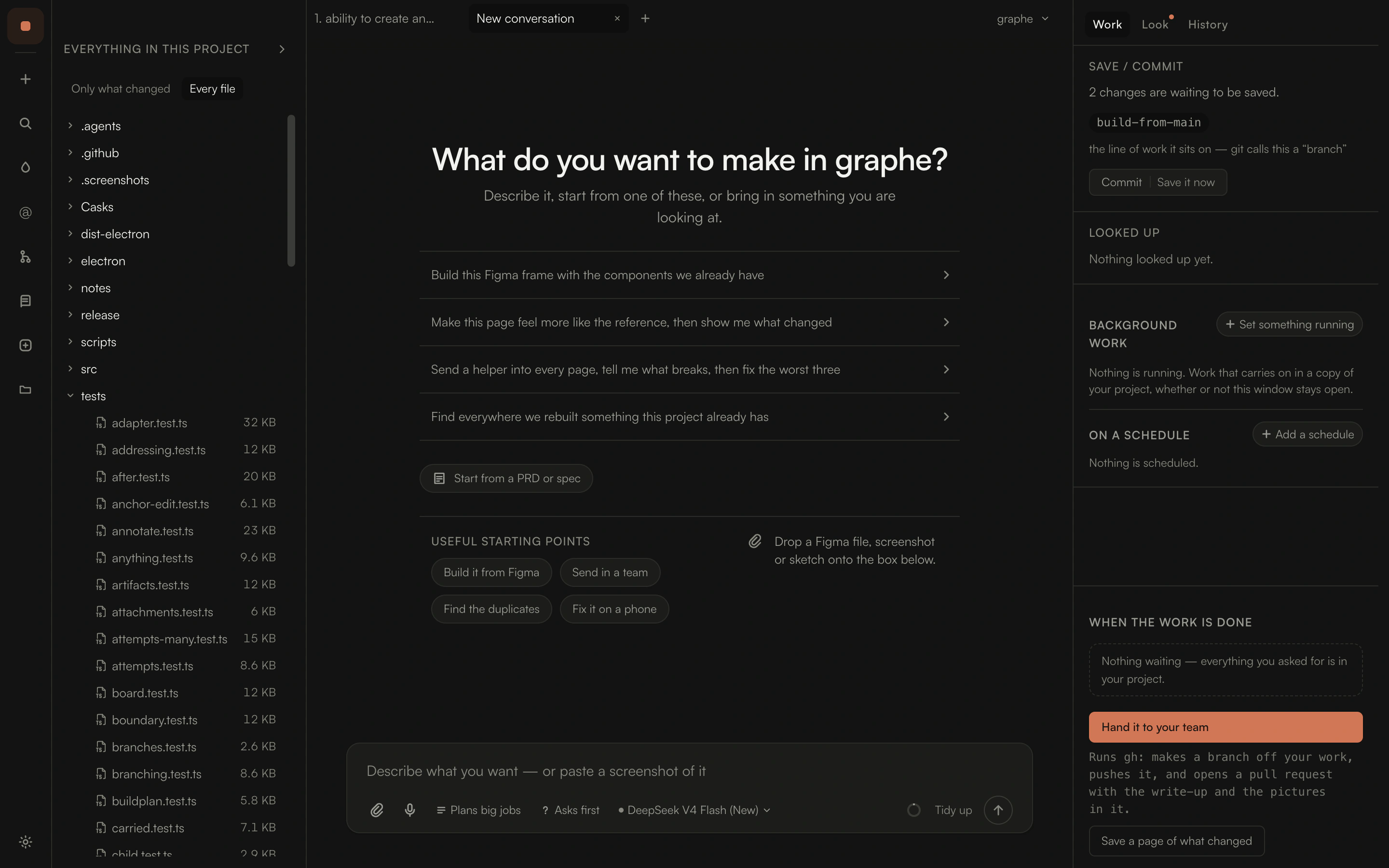
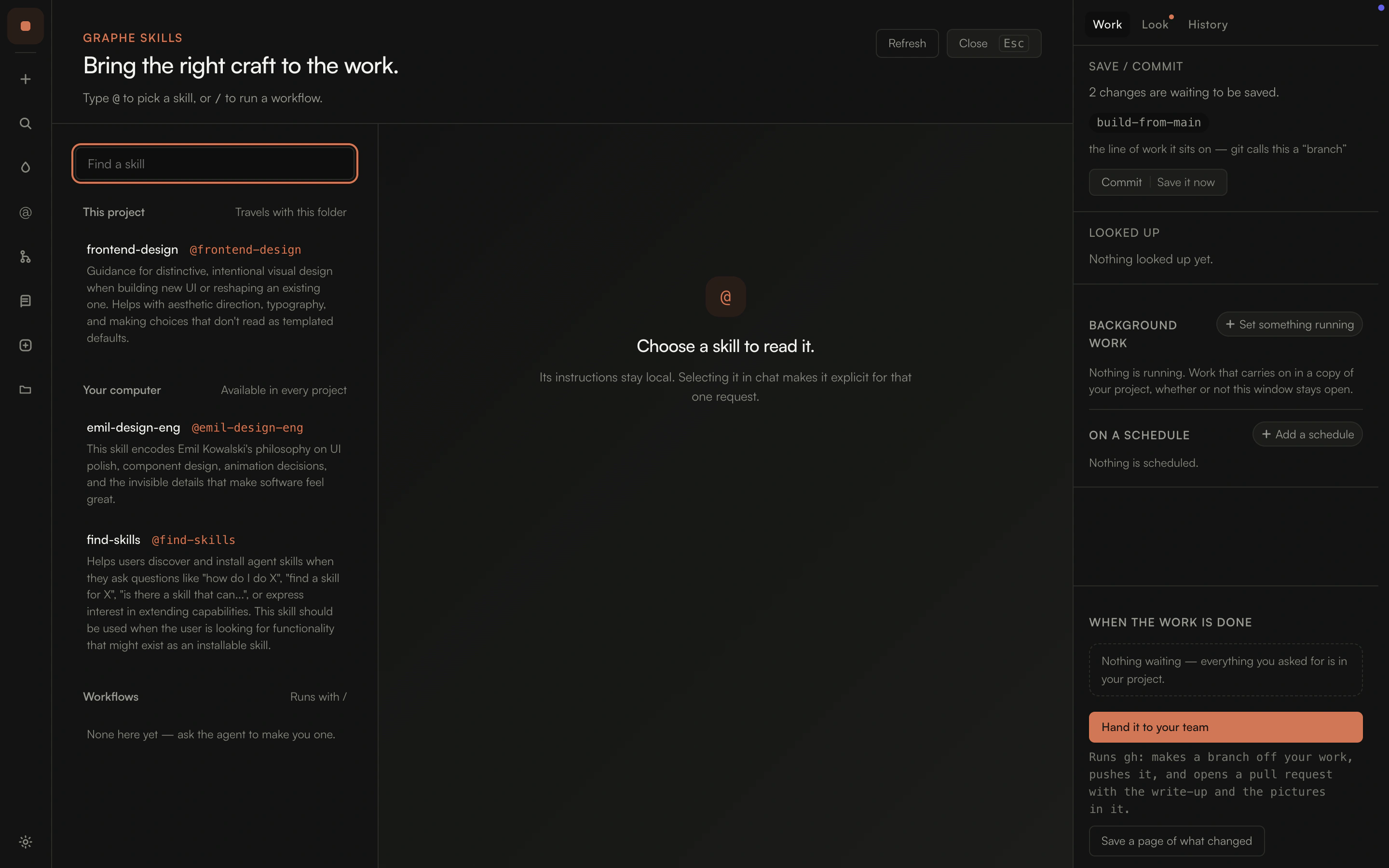
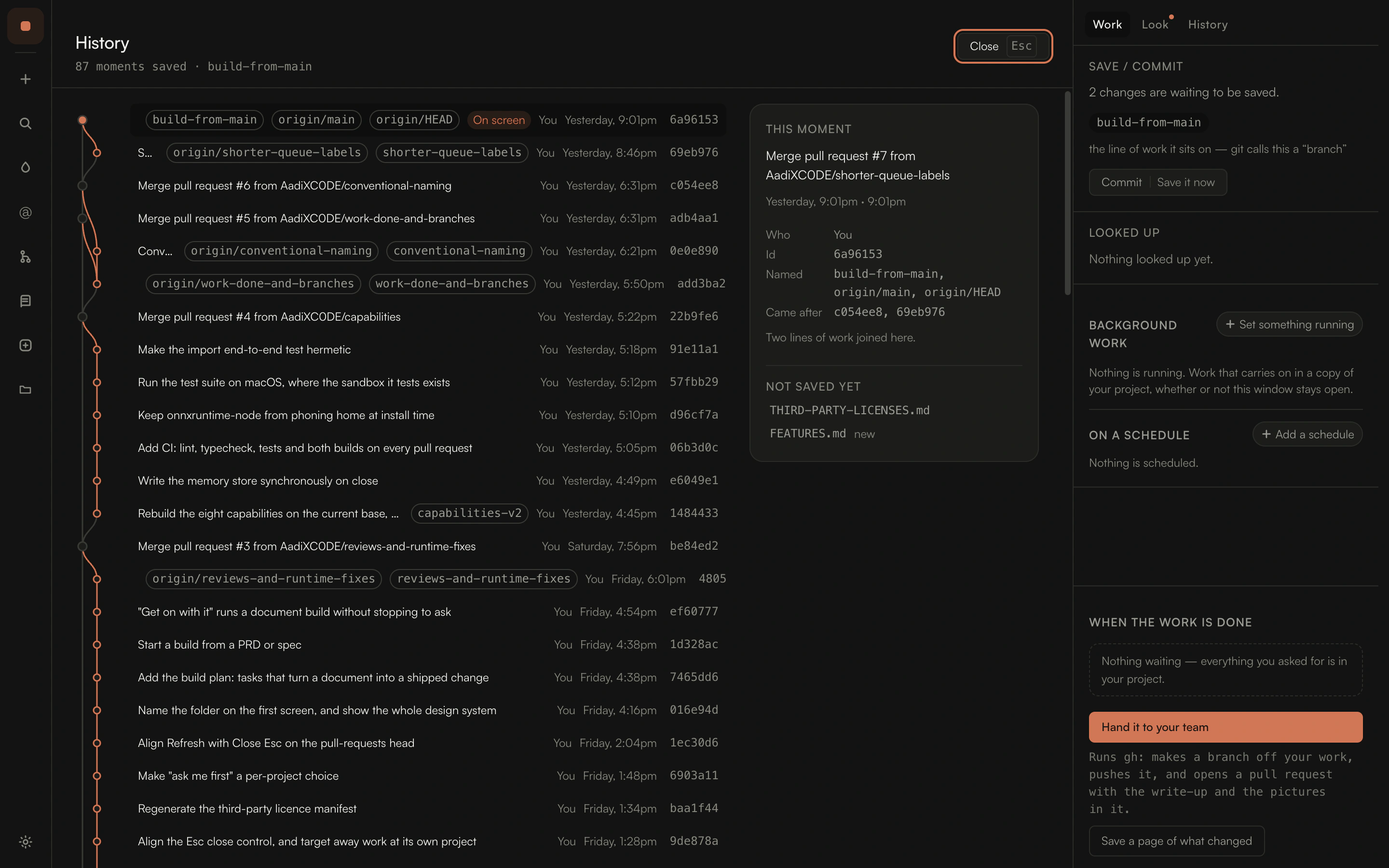
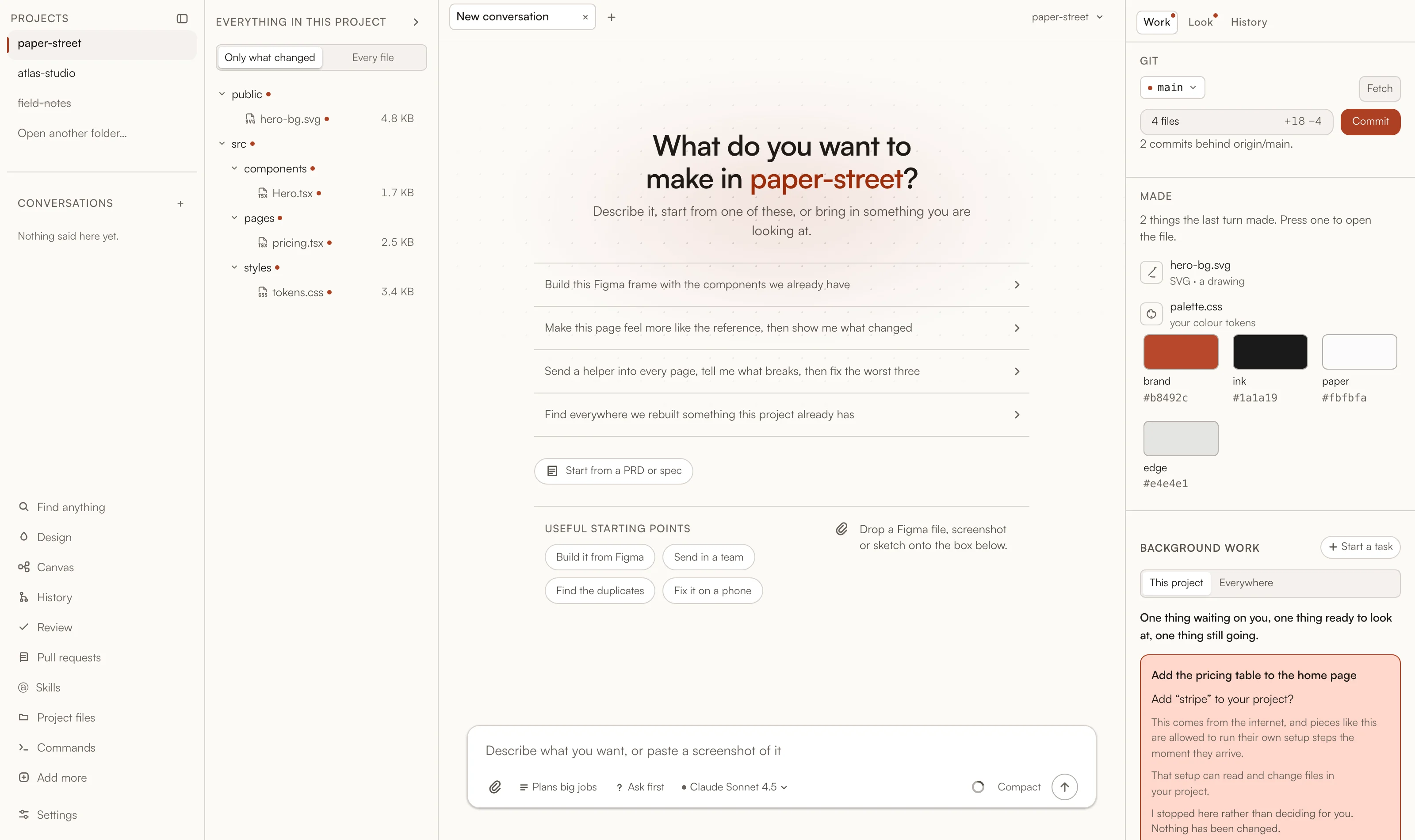
The Graphe window: the project's files on the left, things to start from in the middle, and a rail on the right holding what is waiting to be saved, what is running in the background, what is on a schedule, and the handover. The design view, reading the project's own tokens.css: sixty-six styles, every colour named with its value beside it. The history view: every saved moment drawn as lines, with short ids, parents and the names on each. The skills view: craft installed off the shelf, each one described, ready to bring into a request.
Real screens, taken from the app · a plan, waiting for a yes

What you actually get

The whole agent. Not a chat box with tools bolted on.

pi is a serious coding harness and deliberately ships without sub-agents or plan mode. Graphe is what it becomes with both, plus everything else an interface makes possible.

01

It works in parallel, and it keeps working

One request can become a board of pieces — each in its own copy of the project, four running at once, the rest waiting. Reviewer, researcher, and a builder that writes inside a copy of its own. Set a job going and close the window: it carries on, and you come back to a board of what finished, what's waiting, and what it cost.

A finished piece of work waiting for a decision, with how it looks now beside how it would look if it were let in.

02

It reads your design system first

Colours, spacing and type are read as a spec before a file is touched, so the work lands inside your system instead of on top of it. Figma frames come in as pictures and variables as tokens. Every change is checked at phone, desktop and wide, and anything that drifted from your own styles is named out loud.

A project's own colour tokens, each swatch named with its value beside it, read straight out of the project's stylesheet.

03

You can see the bill before it lands

pi does real work to keep a prompt cacheable — one stable session, cache points where the provider needs them, every read and write recorded. Graphe puts the result on screen: how much of each turn came back from cache, what the sitting cost in your own currency, an estimate before a big job, and a ceiling that ends it.

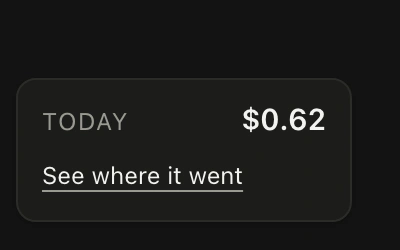
The meter in the corner of the window: today's total, and a way to see where it went.

The rest of it

None of this is an add-on.

pi ships lean on purpose and expects you to bring the rest. Every one of these is in the window the moment you open a folder — nothing to install, nothing to switch on, nothing behind a tier.

Memory between sittings

Facts kept per project on your machine, ranked by meaning, loaded at the next start.

Helpers in parallel

Reviewer, researcher, and a builder that writes — each in a copy of its own, several at once, under a budget.

A review with a verdict

Ships, needs work, or do not land — findings ranked, with file and line, and one press posts them to the pull request.

A real debugger

Attaches lldb, dlv or debugpy to a stuck program. Reads frames, steps, evaluates.

Bring your own tools

Your MCP servers plug in through one file. Started on use, stopped with the sitting.

Papers and PDFs

An arxiv address comes back as words — title, authors, abstract, then page by page.

Diagrams in the conversation

Mermaid fences become pictures in your own palette, or stay code when they can't.

Edits that cannot land blind

A file that changed underneath is refused before a single byte is written.

Figma, both directions

Frames as pictures, variables as tokens, and drift detection that keeps you in step.

Every width, checked

Phone, tablet, desktop and wide — photographed, so you never decide from one size.

Money, in your currency

Every turn accounted for, and a split that separates your work from our own retries.

Skills off the shelf

@skill brings in craft you installed; /command expands a prompt you wrote.

Second thoughts, mid-run

Queue it behind the turn or steer it into the turn. Asked quietly, never an error.

History as lines

The whole timeline drawn out — short ids, parents, branches — for when you want it.

The folder as a tree

Walk it, see what changed, open anything in the editor you already use.

Name it, mark it, fork it

Name a conversation, mark a moment worth returning to, fork a direction and try both.

Try it two or three ways

Goes at the same thing finish side by side, with what each cost. Keep one; the rest are thrown away.

How far a change reaches

It names the files a change would touch, and what it would take, before it makes it.

A map of the project

Folders by size, what each reaches into, where the styles are — read before a request is broken up.

Checks a project wrote itself

One file per check in .agents/checks — a project says what every review must look at.

Copy a conversation

The whole record under a name of its own, opened straight away — no going back, no losing the direction.

The page lives in the window

A browser, beside the conversation.

Not a screenshot of your work, and not a tab you go and find. The running project sits in the window next to the agent building it — which is what makes the four things below possible at all.

Servers that stay up

A dev server, an API, a watcher — several at once. They keep running after the turn that started them and say where they can be reached, with a band above the composer showing what is up and a press to stop it.

Comment on it, like a design

Click anything and write what should change, right where it is. It goes to the agent as an instruction carrying the element and the line it was written on — no describing which button you meant.

Point at anything

Which component made it, which of your tokens it uses, what drifted from them, and where it was written — read off the running page rather than guessed from the source.

Every width, and your own browser

Phone, tablet and desktop without resizing anything. One press hands the same address to Chrome when you want the devtools you already know.

How a sitting goes

Open a folder. Ask for something.
Watch it happen.

  1. 01

    Point it at a project

    No config file, no setup wizard. Open a folder and it is a project — recent ones sit on a shelf with what each cost you last time.

  2. 02

    Say what you want, however you have it

    Type it, paste a screenshot of it, or drop in a Figma frame. Speak it if your hands are busy. There is no syntax to learn.

  3. 03

    Big jobs come back as a plan

    A numbered plan, an estimate of what it will cost, and a wait for “Go ahead”. Small jobs just get done.

  4. 04

    It works where you can see it

    The file tree marks what changed. The rail names what it is doing right now, what it looked up, and what it has made so far.

  5. 05

    You look, then you decide

    Before and after, at phone, desktop and wide. Let it in, or set it aside — setting aside keeps the work reachable rather than throwing it away.

  6. 06

    Hand it to your team

    A write-up with the before-and-after pictures in it, a properly named line of work, and a request ready for whoever reviews. Or a page of what changed for somebody who is not a developer at all.

The foundation

Everything pi gives you.
Everything a terminal can't.

pi is a serious coding harness: any provider, any model, real extensions, and prompt caching engineered properly rather than hoped for. It ships deliberately without sub-agents or plan mode, and it ships in a terminal.

Graphe is everything around it — sub-agents and plan mode among them, plus the window, the guard, the version history, the design panel, the memory, the money and the handover. One module owns every pi import, so an upgrade breaks one file rather than fifty.

  • Any provider, any model, your own key
  • MCP servers and pi extensions, both
  • Local memory and embeddings, offline
  • MIT licensed, all of it readable

pi gives you

  • Any provider, any model, your own key
  • Prompt caching engineered, not hoped for
  • Extensions, skills and prompt templates
  • Sessions, branching and compaction
  • Read, write, edit, find, grep, bash

Graphe adds

  • Sub-agents, several at once
  • Plan mode, with what it will cost
  • A window: projects, tabs, rails, two themes
  • Your design system, read as a spec
  • Version history, with a picture of each change
  • A guard that asks in plain words
  • Background jobs, schedules and servers
  • Code review with a verdict, and the handover
  • Memory between sittings, kept on your machine
  • The money, on screen, in your own currency

Work that outlasts your attention

Send it away.
Come back to a board.

A job that takes four hours does not need you watching it for four hours. Set it running in a copy of your project, close the window, go to lunch. It carries on.

Background work · 3 pieces

Rebuild the pricing page from the Figma library

still going

On step 4 of 9 — rewriting the cards against your spacing scale.

Add the pricing table to the home page

waiting on you

It wants to add something from the internet that runs its own setup steps. It has not.

Fix every heading that broke on a phone

ready to look at

Eleven pages, each photographed before and after. $0.41.

Every conversation gets its own copy

Two, three, four jobs run at the same time without treading on each other, each in its own checkout, and the work comes home when it is done. Running at once is the point, not a queue.

Put it on a schedule

Some work should happen without being asked — a nightly pass over the design system, a weekly check that nothing drifted. Set it once.

A document becomes a shipped change

Hand it a PRD and it comes back as a build plan with acceptance and a tracked checklist. Say “get on with it” and it runs the whole thing without stopping to ask.

Under a ceiling you set

Long jobs are where money goes quietly. There is an estimate before it starts, a running total while it works, and a ceiling that ends the sitting rather than the month.

A new conversation, with things to start from, and a rail showing background work, what is on a schedule, and what to do when the work is done.
The rail keeps background work, schedules and the handover in one column

Both audiences, one app

Plain words on top.
The real thing underneath.

A designer never has to learn what a branch is. A developer never has to guess what just happened. It is one switch, in the row where your hand already is.

What you read

What it ran

Sent. Your team can pick it up from here.

gh pr create --head feat/pricing-cards-2f9x

Four changes are waiting to be saved.

git status --porcelain

Saved before a big change — you can put it back.

git commit -m "save point before restore"

The line of work this sits on.

build-from-main → origin/main

It read your colours and sizes before it started.

read src/styles/tokens.css · 66 properties

One switch in the composer moves every line in this project from the left column to the right. Nothing is hidden from the person who wants it, and nothing is imposed on the person who doesn't.

Nothing leaves this computer.

Your code, your keys and your pictures stay on the machine. Exactly one feature in the whole app sends anything anywhere, it says so before it does, and it refuses outright if a private key is written into what would be sent.

deny by default · tested against prompt injection · a snapshot before anything destructive

You always know what it cost.

An estimate before a big job, a running total while it works, and an end-of-sitting split that shows what your work cost and what our own retries cost. In your currency, not in tokens.

your key · your account · no subscription in the middle

Where it is up to

In beta, in the open, and built by one person.

Everything on this page works today — it is what the app does, photographed from the app. What beta means here is that the rough edges are mine to find and yours to report: the interface still moves, the first release is recent, and the fastest way to change something is to say so. The whole thing is MIT, so nothing about it is a black box.

Open a folder.
Ask for something.
Watch it happen.

Apple silicon and Intel · macOS · bring your own model key